If you’re a small business owner working with website designers, or you’re looking into website designs Melbourne experts, or you’re simply focused on web design for small business – this blog is for you. We will walk step-by-step through how to use the Yoast SEO plugin to give your website the best chance of being found by search engines, while making sure your website designs deliver results.
Why On-Page SEO Matters for Small Business Web Design
Whether you’re engaging website designers or exploring website designs Melbourne-based, you likely know good design is about more than looks! In web design for small business, your site needs to attract the right visitors and convert them into enquiries.
Here’s what you’ll gain by properly completing Yoast:
- Your pages will show up in search engines with clear, engaging snippets — the little summary text users see under a result.
- You’ll give search engines strong signals about what each page is about.
- You’ll improve the odds that your site is seen by the right audience (not just more traffic).
- As website designers already know, it’s easier to build conversion-friendly designs when the foundation (SEO + messaging) is solid.
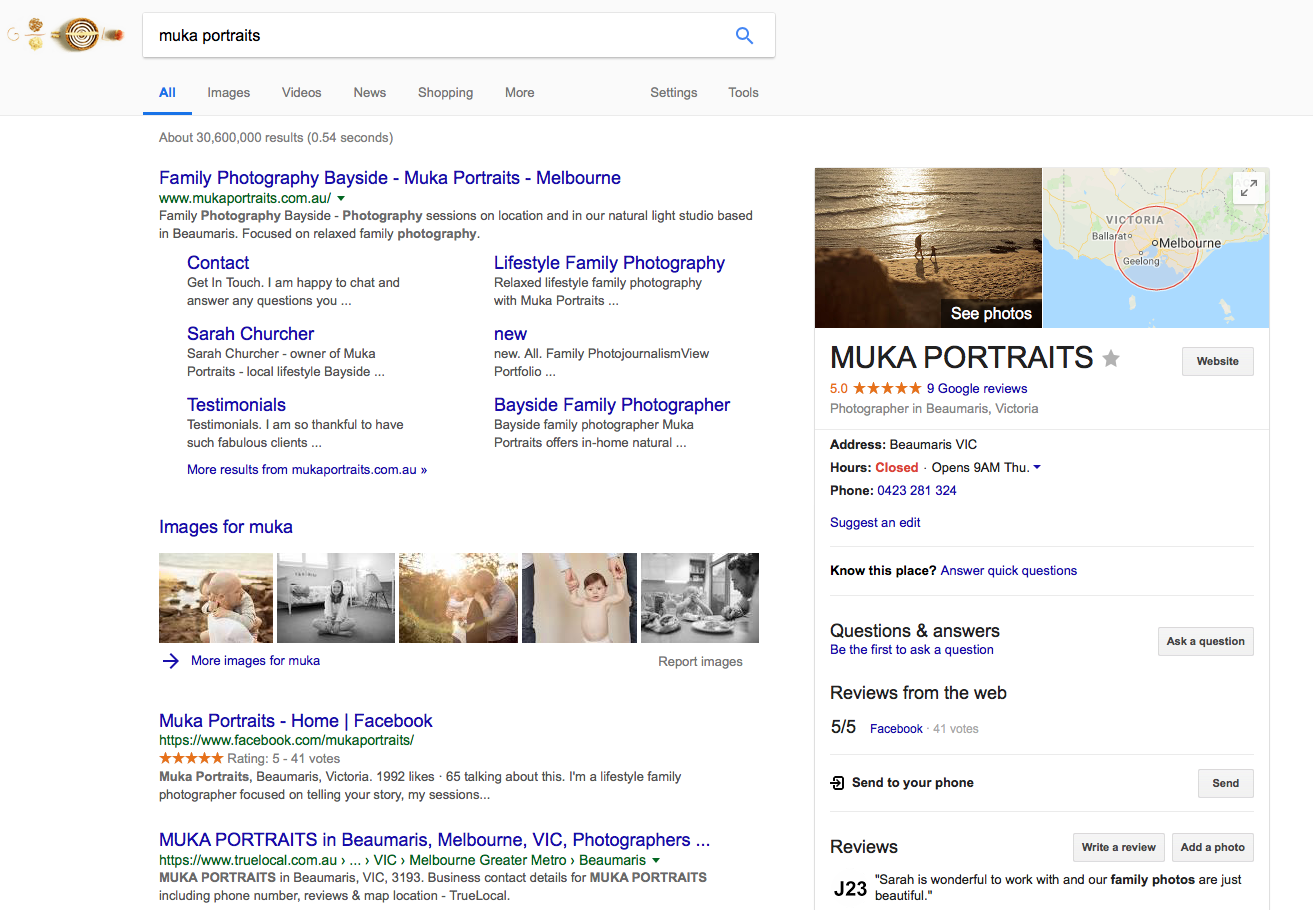
To illustrate this try and google your business name and see what shows on the search engines.

Step-By-Step: How to Complete the Yoast SEO Plugin for Your Page
If you’re a small business owner working with website designers, you can follow these steps (or ask your designer to) to ensure your website designs Melbourne get the on-page SEO basics right. If you’re doing web design for small business yourself, this is a handy checklist.
- Install and Activate Yoast
In your WordPress dashboard navigate to Plugins → Add New, search “Yoast SEO”, install, and activate it.
More and more website designs Melbourne-based include this plugin as standard. - Configure Site-Wide Settings (First Time Only)
- Go to SEO → General → Features and make sure the key modules (SEO analysis, readability, cornerstone content) are on.
- In SEO → Search Appearance, fill in your business name, default meta title and description formats.
- In SEO → Social, link your Facebook, Instagram, LinkedIn profiles (important for small business web presence).
- Edit Each Page/Post Using Yoast Meta Box
At the bottom of each website page edit screen you’ll find the Yoast panel. Here’s how to complete it:- Focus keyphrase: Enter the primary phrase you want that page to rank for. Example: “web design for small business Melbourne” (or customise for a niche).
- SEO title: If not auto-filled, write something compelling and relevant. eg: “Web Design for Small Business | Melbourne Experts”.
- Slug (URL): Keep it short, simple, and include your keyphrase or keyword. Eg: /web-design-for-small-business-melbourne.
- Meta description: Write a short, enticing summary of the page. Keep under ~155 characters so it doesn’t get cut off in search.
- Content analysis: Yoast gives you a traffic-light system (red-orange-green). Work through the suggestions: use your keyphrase in headings, ensure alt text on images, internal links, outbound links to credible sources.
- Readability analysis: Helpful for web design for small business sites because your audience may not be SEO experts. Aim for shorter sentences, sub-headings, transition words — Yoast will flag anything to improve.
- Cornerstone content: If this page is a pillar page (such as “website designs Melbourne – how to choose”), mark it as such so you can prioritise it in your structure.
- Schema & Social Previews
- Preview how your page looks on Google (SERP snippet) and on social media (Facebook/Twitter). Yoast lets you customise this in the “Social” tab.
- For small business web design, this is key: you want the snippet and preview to clearly communicate your expertise in website designers and website designs Melbourne.
- Technical Checks & Indexing
- In SEO → Tools → File editor, ensure you have a valid robots.txt and .htaccess if you’re comfortable editing—with help from your website designers if needed.
- In SEO → Search Appearance → General, confirm your site is set to be indexed (unless intentionally hidden).
- Submit your sitemap: SEO → General → Features ensures the XML sitemap is generated, then copy the URL (usually /sitemap_index.xml) into your Google Search Console.
- Check the “Advanced” tab on each page to ensure “Allow search engines to show this Post in search results?” is set to Yes (unless private).
- Monitor & Improve!
After publishing, you’ll want to keep an eye on how your pages perform. Use tools like Google Analytics and Google Search Console to check clicks, impressions and click-through-rates (CTR). If your meta description is showing but CTR is low, rewrite it.
This is where your strategy for web design for small business must tie into SEO—for example if you’re focusing on “website designers” in Melbourne, you can evaluate which pages attract those search terms and refine accordingly.
Common Mistakes to Avoid When Working with Website Designers
When hiring website designers or reviewing website designs Melbourne proposals, here are pitfalls to watch out for:
- Ignoring on-page: Many designs look great but neglect SEO setup via Yoast. Make sure it’s part of the build.
- Generic meta descriptions: If your meta description doesn’t reflect the unique value of your small business, you’ll miss out.
- No keyphrase diversity: For a small business site you may want multiple pages targeting “web design for small business”, “website designers Melbourne”, “ecommerce web design Melbourne” etc. Each should use Yoast properly.
- Neglecting mobile readability: Your website designers must optimise for mobile. Yoast readability and mobile-first indexing go hand in hand.
- Neglecting schema/social preview: If your preview looks poor in search results or on social, you’ll lose leads even if you rank.
Why Confetti Design (Melbourne’s Small Business Web Design Specialist) Helps
At Confetti Design, our focus is helping small businesses in Melbourne and beyond get website designs that convert. We are expert website designers who combine great visuals with strategic SEO — including full setup of the Yoast plugin — so you don’t just get a pretty site, you get a site that works.
If you’re actively searching for website designers or exploring website designs Melbourne, or simply want professional web design for small business that leads to enquiries (not just traffic), then talk to us. We’ll ensure your site is built on a solid foundation of SEO + conversion.
Yoast SEO Plugin Wrap Up
Completing the Yoast SEO plugin properly is one of the best things you can do when your site is live — especially if you’re a small business looking for high-quality traffic, not “just visitors”. Whether you’re working with website designers, reviewing website designs Melbourne proposals, or managing web design for small business yourself — following this updated tutorial will help you get search-friendly, conversion-ready pages.
If you’d like help reviewing your Yoast setup, auditing your website’s SEO, or designing a new small business site with SEO built-in from day one — we’re here. Let’s talk.
Confetti Design Website Designers
If you still not sure about how to optimise your website design with the Yoast SEO plugin than talk to Confetti Design. With hundreds of website designs under our belt, we can guide you with expert website design and website development knowledge.